
Last checked 24 November 2026
If you already use ChatGPT, Claude or Copilot, the fair question about a paid grant tool is what it adds.
Hinchilla runs on the same kind of AI models; what it adds is the work around them. Before drafting, it is built to research the funder, check for anything that stops you applying and collect the real application questions with their guidance. It is then built to draft from your own documents and earlier applications and review each draft comprehensively. It also drafts funding letters where a funder has no form, and reports to funders. Below, Hinchilla is set next to general assistants, other AI grant tools and funder databases.
A word about us first: we make Hinchilla, so we have an interest. We name the other options, including competitors, with facts from their own websites and the date we checked them.
In short
- Your data: Hinchilla doesn't train AI on your data, and the AI services it uses don't train on data sent through their APIs. Personal ChatGPT and Claude plans may use your chats for training unless you opt out.
- More than form answers: Funder search, reports to funders and funding letters where a funder has no form.
- Any funder, anywhere: name a funder and Hinchilla researches it. Don't know a funder? Our funder search gives a reason for each funder it suggests.
- The whole team: no limit on colleagues invited, all working from one document library and organisation memory.
- Other AI grant tools also match funders and help with drafting; the table below shows what each includes.
- A simple test: give a general assistant and Hinchilla the same project/charity. If the general assistant finds the funders and writes the application as well or better, use it. Hinchilla's trial is free for 4 weeks, with no card required up front.
What Hinchilla is
Hinchilla finds funders and drafts grant applications for charities and other non-profits. Grant applications work for any funder anywhere in the world: you name the funder and Hinchilla researches it, or writes a funding letter (case for support) where there is no form. Funder search uses Hinchilla's directory: describe a project and it looks for funders that serve its area, wherever they are based. In the app it draws on over 8,000 UK and about 44,000 US funders, so how many it finds varies by country.
Free: a directory of over 8,000 UK funders, a US funder directory (over 5,000 funder pages so far) and daily alerts of changes at UK funders. Paid plans start at £49, $59 or €59 a month, with a 4-week free trial (no card) and a 30-day money-back guarantee.
Hinchilla and ChatGPT, Claude or Copilot
You can use general AI assistants for grant writing, but how does that compare to tools like Hinchilla?
Finding funders
With a general assistant, you ask for suggestions, then check each funder is open and funds your kind of work and area. You are relying on the assistant to find funders from its web searches and what it learned in training, which can be out of date.
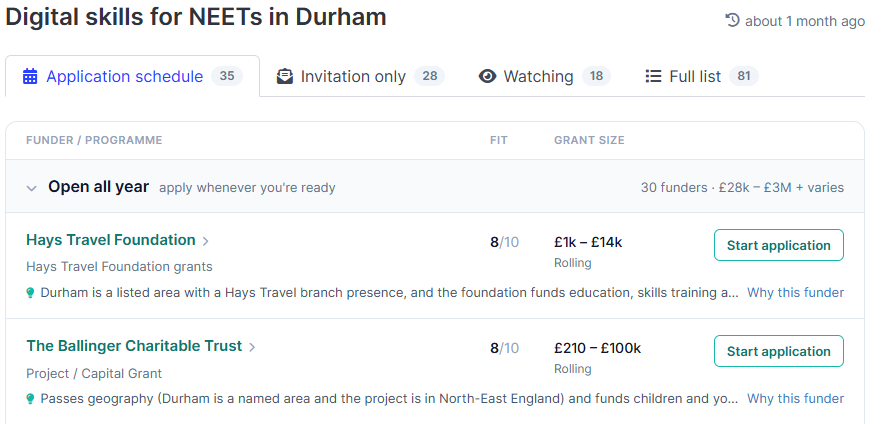
In Hinchilla, funder search works from our own database of over 50,000 UK and US funders and runs an advanced match against your project. It then shows funders and when you can apply to them, with a ranking and match reason for each funder.
Knowing the funder
With a general assistant, you paste in the funder's guidance, or ask the assistant to look it up.
Hinchilla shows you its own deep research on the funder. This covers the easier-to-find information, such as grant programmes, process, timeline and contacts, but also recent updates and details such as individual grants the funder has made in the past.
Checking you can apply
With a general assistant, you check the round is open and you are eligible.
Hinchilla checks first for a closed or paused round, a funder that doesn't take unsolicited applications, an eligibility problem or an unpublished form. Hinchilla already does this before showing you funders, so you get the best fits. Once you start an application, it will highlight anywhere your application is weak against what this funder looks for, and how to improve it.
The real questions
With a general assistant, you copy in the questions and guidance.
Hinchilla does its best to download the blank form, or copy the questions and guidance word for word, from the funder's page. If it can't (a login-gated portal, a paper form), it asks you for the form rather than guess.
Word and character limits
With a general assistant, it will do its best to match these, but you will need to double-check them yourself.
Hinchilla is built to keep within each limit and makes it easy to see how much of the limit was used for each answer.
Your documents
With a general assistant, you give it the documents it needs, in each chat or in a project.
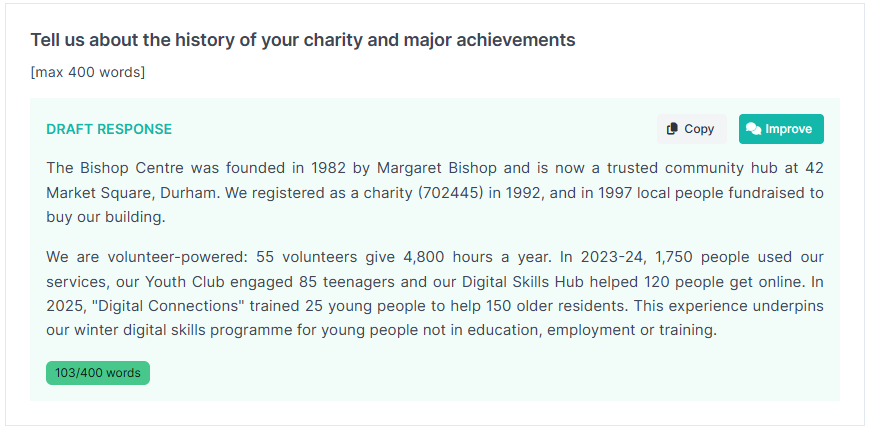
In Hinchilla, one library and organisation memory is shared by every application and colleague. Our AI is built to check your recent applications first, then your documents, to take facts from them or web research rather than invent them, and to total spreadsheet figures with a calculation tool, citing the file and rows.
Your voice
With a general assistant, you can expect a more generic voice unlikely to represent your organisation. It will likely be professional but lacking your unique character.
Hinchilla is built to write from your own documents and to learn over time how you like to write. Hinchilla will also adjust its writing style to fit the funder you are applying to.
Checking the draft
With a general assistant, you ask it to review the draft, one prompt at a time.
Hinchilla is built to review each draft comprehensively and highlight any gaps and improvements.
I was impressed with Hinchilla, specifically that it researched each trust's requirements/application rules and then created a draft for me based on this using the information in the documents I had uploaded.
Your documents and data
In Hinchilla: we do not train AI models on your data, and the AI services we use do not train on data sent through their APIs.
In a general assistant: whether chats are used for training depends on the product, plan and settings. Anthropic's consumer terms (effective 8 October 2025) and privacy policy (effective 10 September 2026) say it may use chats on personal Claude plans (Free, Pro and Max) to train its models unless you opt out in your account settings; its business products and API are not used for training by default. OpenAI's help page (read 23 November 2026) says that on its plans for individuals (Free, Plus, Pro) "we may use your content to train our models" unless you turn off "Improve the model for everyone" under Settings, Data controls; by default it doesn't use ChatGPT Business, Enterprise, Edu or API data to improve its models. If colleagues use personal plans for work, check each account's setting.
Hinchilla and other AI grant tools
The difference, on what each site says: Hinchilla drafts reports to funders as well as applications and funding letters, researches any funder you name, anywhere, and has a 4-week trial with no card. GrantBridge, FundRobin and Grants AI also pair funder matching with drafting. Quotation marks below mark their own words; "not stated on its site" means we looked and found nothing either way.
| Hinchilla | GrantBridge | FundRobin | Grants AI | |
|---|---|---|---|---|
| Funding letters and reports | HinchillaFunding letters where there is no form, and reports to funders | GrantBridgeTracks awards and report due dates; drafting letters or reports not stated on its site | FundRobinFunder-specific proposals; tracks reporting deadlines; drafting reports not stated on its site | Grants AILetters of inquiry and a case for support; reports not stated on its site |
| Who it is for | HinchillaCharities and other non-profits anywhere; applications to any funder you name | GrantBridge"Grant software for UK charities" | FundRobinNon-profits, researchers and startups in the UK, US, EU and elsewhere; other funding you add as "private opportunity uploads", 2 a month on Growth, unlimited on Impact | Grants AI"UK charities only" |
| Colleagues | HinchillaNo limit on colleagues invited | GrantBridge"Unlimited team members" | FundRobin2 users on Growth, 5 on Impact | Grants AIIts Enterprise plan is for charities that "need more than 3 users" |
| Free trial | Hinchilla4 weeks, no card | GrantBridge7 days; your card is charged at the end unless you cancel | FundRobinA 30-day "Showcase Trial" if it approves your application, no card | Grants AI7 days, no card |
| Research on the funder you apply to | HinchillaBuilt to start from Hinchilla's own research where the directory holds the funder, otherwise from the web, and to check the funder's own website | GrantBridgeRecords from the UK charity registers and 360Giving data; open rounds from funders' websites | FundRobinOpportunity data from the sources it indexes | Grants AIHome page: "every funder website" and "every publicly available application form", plus ex-grantee data on about 7,000 funders. Roadmap: website data and application forms "coming soon" |
| Checks before drafting | HinchillaBuilt to check for a closed round, an invitation-only funder, an eligibility problem or an unpublished form | GrantBridgeChecks eligibility before you draft | FundRobinScreens for hard eligibility rules first when matching | Grants AIFinds the grants you are eligible for from your charity number |
| The application's questions and limits | HinchillaBuilt to collect them word for word, with their guidance and limits, or ask you for the form | GrantBridgeA workspace with each grant's questions and word counts | FundRobinThe exact questions and "response constraints" where verified questions are available | Grants AIDrafts answers for each application form on your shortlist; word limits not stated on its site |
| Drafting from your documents | HinchillaBuilt to use your document library, earlier applications and organisation memory | GrantBridgeDrafts from your organisation's facts and an evidence bank | FundRobinDrafts from an "Organisation Brain": your profile, past proposals and annual reports | Grants AIDrafts from your case for support and each funder's published criteria |
| Checking the draft | HinchillaDrafts, then reviews responses comprehensively, listing its sources and any problems or improvements to the application | GrantBridgeFlags missing evidence, expired policies and unanswered questions | FundRobinMarks gaps "Input Required"; its assistant suggests changes for a person to approve | Grants AI"Application review" is in its menu; what it checks is not stated on its site |
| Entry price | Hinchilla£49 a month: 2 applications and 1 funder search | GrantBridge£24 a month per organisation: "60 AI drafts a month" | FundRobinGrowth £49 a month: 3 proposal drafts, with exact limits that "will be confirmed" | Grants AIStandard £300 a year: 20 applications, 40 letters of inquiry, 120 prospects a quarter |
Each tool counts something different: a Hinchilla application covers the research, questions, first draft, reviews and all refining, and the other pages don't define a "draft" or "application" closely enough to convert.
Sources, each provider's own pages, read 24 November 2026: GrantBridge (home, pricing, product tour, FAQ, matching and application pages); FundRobin (home, pricing, feature and Showcase Trial pages); Grants AI (home, features, plans, FAQ, roadmap).
Hinchilla and funder databases
The difference: Hinchilla publishes a researched, plain-language page for each of over 8,000 UK funders, free; funder search ranks funders for your project with a reason for each; and the same tool drafts the application. A funder database is a searchable set of funder records that you filter and judge yourself. The main ones, with prices from their own websites:
- Funds Online (Directory of Social Change): DSC has closed, and Funds Online runs for existing subscribers for now. Our guide covers what to use instead of Funds Online.
- GRANTfinder (Idox): £1,020 a year for one user at a UK voluntary organisation, or £1,500 a year for up to three users. grantfinder.co.uk
- My Funding Central (Idox): from £100 a year, for charities and voluntary organisations in England. myfundingcentral.co.uk
- Grants Online: £17 plus VAT a month or £125 plus VAT a year for one user. grantsonline.org.uk
- Free: Charity Excellence Funding Finder, Get Grants, 360Giving GrantNav (grants funders have already made) and GOV.UK Find a grant.
- In the US: Instrumentl, from $299 a month paid annually ($349 paid monthly); and Candid's Foundation Directory (candid.org).
What one Hinchilla application includes
One application is one new grant application or one funding letter to one funder. It covers the setup, in which Hinchilla is built to research the funder, check for anything that stops you applying, collect the questions and limits and propose an amount to ask for; the first draft and its review; and any questions you add later and all the refining.
Plans start at £49, $59 or €59 a month for 2 applications and 1 funder search, up to 12 applications and 4 searches a month on the largest plan. See pricing.
The free trial lasts 4 weeks, no card, with one funder search and one application a week. A trial search shows 3 of the funders it finds in full; the rest unlock when you subscribe.
What Hinchilla doesn't do
- Track your applications. Hinchilla has no application tracker for deadlines, stages and outcomes. Keep your own tracker or spreadsheet alongside it.
- Submit for you, or replace your own checks. Hinchilla is software. It drafts; you check every draft, make it your own and submit it. Like any AI, it can get things wrong.
- Promise funding. We can't show you a success rate, and we don't promise funding. Funders decide.
Where Hinchilla fits
- A trusts fundraiser wanting a steady flow of applications: Hinchilla is built to start each application from research on the funder and its real questions, drawing on your own documents and earlier applications.
- Consultants and freelancers writing for several organisations: Hinchilla's Clients feature, with a separate library and memory for each organisation.
- Outside the UK: applications work for any funder, anywhere, and prices are in pounds, dollars or euros. Funder search draws on a directory of UK and US funders, so results elsewhere vary.
Hinchilla has been fantastic. Being able to upload key information, such as past grant applications and reports, detailed financial information, and even tone of voice, and then have its powerful AI generate answers to all application or reporting questions is absolutely game-changing. With the general move to application forms that we are seeing in grant fundraising, I can't recommend this tool enough.
Questions people ask
Can funders tell AI was used?
Sometimes, especially with generic AI text, and some funders have rules about AI. Read our guide to funder AI policies, make every draft your own, and be ready to say how you used AI.
Do I need documents to start?
No, Hinchilla can research your organisation and start applications right away. Adding more documents or chatting to Hinchilla will improve the results you get.
Can colleagues use it?
Yes. Account owners invite colleagues as owners or members, with no limit on how many, and everyone works from the same document library and organisation memory.
About this page
Facts about other tools come from each provider's own website, checked on 24 November 2026 unless another date is given next to them. If something here is wrong or out of date, email support@hinchilla.com and we'll correct it.
Try Hinchilla free today
4-week free trial, no card needed. Then compare our funder matches and draft application with what you get elsewhere.
Or search over 8,000 UK funders for free, no signup.